
Being able to answer the doorbell from your phone is convenient. Getting a reliable connection to that doorbell starts much earlier, when the walls are still open and it’s easier to run cable. The same goes for ceiling Wi-Fi access points, motorized shades, and speakers on the patio.
Ambassador Builders designs and builds custom homes in Pflugerville, TX. If smart features are part of your plans, bring them up early so the wiring, network, and controls can be considered alongside the floor plan. Call (512) 387-6592 to talk about your project.
What Is a Smart Home?
A smart home uses connected devices to control or monitor things like lighting, heating and cooling, door locks, cameras, shades, and audio. Depending on the equipment, you might use a wall control, a phone app, or a voice assistant. Some functions work through the home network, while others require internet access.
Start with what you want to make easier. You might want the porch light to turn on at dusk, a doorbell alert when a package arrives, or a thermostat that follows a weekday schedule. Those uses help you decide what belongs in the build.
Why Build Smart Features During Construction?
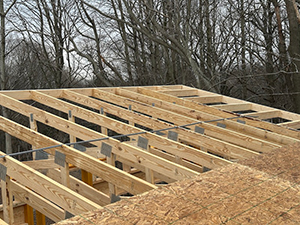
Open walls give installers easier access to run cables and place connection points. Adding the same wiring after move-in may mean cutting and patching drywall.
Plan the connections before choosing every device. For example, you can identify where an office needs Ethernet or where a camera may need power even if you haven’t picked the equipment yet. Confirm the wiring requirements before installation if the location depends on a specific product.
How Smart Home Construction Works
Smart home planning starts with the rooms and features you’ll use. Put the agreed wiring, equipment, setup, and testing responsibilities in the project scope so everyone knows what’s included.
Preconstruction Wiring
Prewiring means installing cables before the walls close. Depending on your plans, the wiring scope may include:
- Ethernet to offices, media rooms, and Wi-Fi access points
- Cabling for compatible doorbells and outdoor cameras
- Power or control wiring for selected motorized shades
- Speaker wire for indoor or outdoor audio
- Spare conduit along routes that would be hard to reach later
Choose an accessible spot for network equipment, with suitable power and ventilation. Mark where each cable starts and ends so the connections can be labeled and found later.
Network Coverage
Wi-Fi performance depends on the floor plan, distance, and building materials. One router may cover a compact home. A larger home, several floors, or a garage separated by thick walls may benefit from additional access points.
Identify the places that need reliable service, such as a home office, media room, patio, or outdoor camera location. If the plan calls for wired access points, include their cable runs before drywall. Agree on where Wi-Fi will be checked once the network is running.
Compatible Controls
Choose how you want to control each feature before buying equipment. A wall switch may be the simplest way to turn on a light, while a phone app may be useful for checking a camera away from home. If you want one app or hub to handle several devices, check the exact models and functions it supports.
Some devices require a separate hub, an internet connection, or a subscription for certain features. Check those requirements before ordering, especially if you want a particular routine, such as turning off selected lights and lowering the shades at bedtime.
Commissioning
Commissioning means configuring the installed equipment and testing the functions agreed on for your project. A checklist can include:
- Connecting devices to the network and control platform
- Trying selected switches, sensors, cameras, and thermostat controls
- Running agreed schedules, alerts, and other automated routines
- Checking Wi-Fi in the rooms and outdoor areas identified during design
- Recording any issues and agreeing on how they’ll be addressed
Confirm who performs the checks and whether internet service needs to be active first.
Owner Handover
Use the handover to try the controls you’ll use most. Ask which setup services and records are included. A handover can cover a device list, warranty information, labeled wiring or network notes, and contact information for service.
Where the platform supports it, set up or transfer accounts to the homeowner. Use your own passwords and remove temporary installer access when it’s no longer needed. For more ideas on planning connected features, see our smart home planning guide.
Popular Smart Home Features
Smart Lighting
Dim lights from a wall control or app, set porch lights to come on at dusk, or use a motion sensor in a hallway.
Smart Thermostats
Set heating and cooling schedules or adjust the temperature remotely. Some models can learn your routines. Energy savings depend on the home, the equipment, and how you use it.
Smart Security
Video doorbells, cameras, locks, and sensors can send alerts through compatible apps. If you want professional monitoring, check which equipment and subscriptions the provider requires.
Smart Appliances
Some appliances can send a notification when a cycle ends or let you check settings from an app. Check the exact model for supported functions and any restrictions on remote operation.
Energy Management
Energy monitors can help you spot patterns in electricity use, while scheduled lights or automated shades can help manage when lights are on or how much sun reaches a room. If solar is a future goal, discuss roof space and electrical provisions during design.
Home Entertainment
Plan TV locations, wired network connections, and speaker cable before the walls close. Think about where the equipment will sit and how you’ll reach it for service.
Why More Families Want Smart Homes
The practical benefits are often small things you’ll notice every day: getting an alert when someone rings the doorbell, adjusting the temperature before you get home, or turning off several lights with one control. Schedules can also help reduce unnecessary energy use. Spare cable routes and a network planned around the floor plan can make future additions easier.
Build Your Smart Home With Ambassador Builders
Bring a short list of the features you want to use most. Decide what needs wiring, where Wi-Fi needs to reach, which controls should work together, and who will test the features you’ll rely on.
To discuss smart home construction in Pflugerville, TX, call Ambassador Builders at (512) 387-6592. We can talk through your custom home plans and the features you want to include.
Frequently Asked Questions
1. What does smart home construction cost in Pflugerville, TX?
Cost depends on the home’s size, the number of cable runs, the equipment you choose, and how much setup and testing you want included. Ask for an itemized estimate so you can compare prewiring, devices, installation, and any ongoing fees separately.
2. What is prewiring, and do I really need it?
Prewiring means running cables before the walls close. It’s useful for wired devices or locations that would be hard to reach later, such as a ceiling access point or an exterior camera. The features you want determine which runs are worth including.
3. Will my Wi-Fi reach every room in my new home?
Coverage depends on the layout, materials, and equipment placement. Mark the rooms and outdoor areas where you need a reliable connection, then confirm whether coverage testing at those locations is included.
4. Can I control everything from one app?
Only if the platform supports the selected devices and the functions you want. Check the exact models before buying. Some features may still need the manufacturer’s app, a separate hub, or a subscription.
5. What happens if a smart device stops working after I move in?
Start with the device model and the service contact listed in your project records, if provided. The installer, device manufacturer, or internet provider may be the right contact, depending on the problem. Check the warranty terms for the specific product.
6. Can I add more smart features later?
Often, yes. Spare Ethernet runs, conduit, and enough network coverage can make additions easier. The best places to prepare now depend on what you may want to add later.