
If you want a wired camera over the garage, decide where it will go while the framing is still open. Running a cable at that stage is usually simpler than cutting and patching drywall after you move in. The same planning applies to Wi-Fi access points, patio speakers, and the controls you’ll use every day.
Ambassador Builders designs and builds custom homes in Taylor, TX. Our design process starts with a conversation about your needs, budget, and timeline. If you’re planning a smart home, bring a short list of what you want it to do so those features can be discussed before construction. Call (512) 387-6592 to talk about your plans.
What Does Smart Home Construction Mean?
Smart home construction means planning connected features as part of the build. That includes the devices you’ll see, such as thermostats and locks, and the details you won’t, such as cable routes, switch box space, and a place for network equipment.
Start with what you want to do. If you want to answer the doorbell from your phone, for example, ask what power and network connection it needs, where the camera should face, and whether the feature requires a subscription. Those answers help determine what belongs in the construction plan.
Preconstruction Wiring: Do It Before the Walls Close
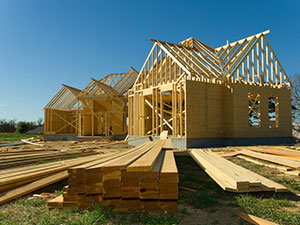
Plan cable routes and device locations before construction. The wiring can then go in while the walls are open, before insulation and drywall cover the framing.
Start with the rooms and outdoor areas where you’ll use connected devices. Mark the home office, TV locations, patio speakers, and any cameras you want at entrances or gates. Depending on the equipment you choose, the plan may include:
- Ethernet cable, such as Cat6, to offices, media rooms, and wired access points
- Low-voltage wiring suited to the selected doorbells, cameras, speakers, and keypads
- Switch boxes with room for the selected controls and a neutral connection where the device requires one
- Spare conduit along routes that would be difficult to reach after construction
Review the locations on the floor plan with your project team. A cable marked “garage camera” should have a defined endpoint, not just a note on the estimate.
Network Coverage: Wi-Fi That Reaches Where You Need It
One router may work in a compact home. In a larger house, distance, walls, and building materials can leave weak spots. Wired access points placed around the floor plan can extend coverage to the rooms and outdoor areas where you need it.
Choose an accessible spot for the network equipment, with power and ventilation suited to the gear. Then identify where coverage matters most, including any home office, garage, patio, or outdoor camera location that will rely on Wi-Fi. If coverage testing is included, agree on where it will be checked and how the results will be recorded.
Compatible Controls: Choosing Devices That Work Together
Decide how you want to control the house before buying devices. You might want wall controls for lights, a phone app for cameras, and a thermostat you can adjust without opening an app. If you want one app or hub to handle several systems, check the exact device models and the functions each one supports.
Compatibility can depend on a hub, subscription, or internet connection. Write down the routines you care about, such as a bedtime setting that turns off selected lights. Check that the proposed devices can run those routines before you order them. Spare cabling and conduit can also make later additions easier.
For more on choosing connected features early, see our guide to planning a smart home.
Saving Energy in Taylor’s Hot Summers
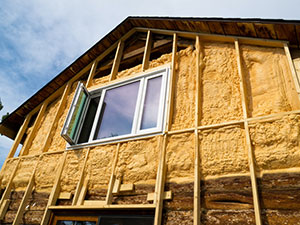
Start with insulation, air sealing, window placement, and shade. Those choices can reduce heat gain before the air conditioner has to deal with it. Proper HVAC sizing matters, too. If you want separate temperature control in different parts of the house, ask whether zoning makes sense for how the home is designed and built.
Smart controls can help manage energy use once the basics are in place. A thermostat can follow a schedule, occupancy sensors can turn off lights in empty rooms, and an energy monitor can help you spot patterns in electricity use. If solar is a future goal, discuss roof space, equipment locations, and electrical provisions while the plans are still flexible.
Actual savings depend on the home, the equipment, your habits, and utility rates. For more on the building details that affect comfort, see our guide to building an energy-efficient home in Taylor.
Commissioning: Testing Before You Move In
Commissioning means configuring the installed systems and checking that they do what you agreed on. Before work begins, decide who will perform the checks, what will be tested, and how any issues will be handled.
- Connect the devices included in the scope to the network and control platform.
- Try the agreed controls, such as operating a lock from the app or changing the thermostat schedule.
- Check Wi-Fi in the locations identified during design.
- Run any agreed routines, such as a bedtime scene or doorbell alert.
- Record any issues and agree on when to check them again.
If setup requires active internet service, coordinate the connection date with the testing schedule.
Owner Handover: Making Sure You Know Your Home
Use the walkthrough to try the controls yourself. Confirm which smart home records and setup services are included in your proposal. A handover can cover:
- A demonstration of everyday controls and routines
- A device list with model numbers, locations, and available warranty information
- Owner account setup or transfer where the platform supports it
- A wiring map or labeled connections for future service
- Contact information for help with equipment, accounts, or the network
Review who has access to each system and remove temporary installer access when it’s no longer needed.
Why Work With Ambassador Builders?
Ambassador Builders’ custom home process includes design coordination, construction management, and a final walkthrough. If smart features are on your list, use the design conversation to decide what belongs in the build and who will handle wiring, equipment setup, testing, and handover.
Ready to talk about smart home construction in Taylor, TX? Call Ambassador Builders at (512) 387-6592 to discuss your floor plan and the features you want to include.
Frequently Asked Questions
1. What is smart home construction in Taylor, TX?
It means planning wiring, network coverage, device locations, and controls as part of the home design. You can install selected devices during the build and prepare other locations for equipment you may add later.
2. Why should wiring be done before drywall goes up?
Open walls make it easier to run cable to the locations you need. Adding the same cable later may require cutting, patching, and painting, depending on the route.
3. How do you make sure Wi-Fi reaches the whole house?
Identify where you need reliable coverage and plan access points around the floor plan and building materials. If testing is part of the project, agree on which rooms and outdoor areas will be checked once the network is running.
4. Will my smart devices all work together?
It depends on the exact models, the control platform, and the functions you need. Check compatibility before buying equipment, including whether any devices require a separate app, hub, or subscription.
5. What is commissioning in a smart home build?
It’s the setup and testing of the installed systems. Depending on the agreed scope, it can include device controls, Wi-Fi checks at specified locations, and routines such as lighting schedules or doorbell alerts.
6. What do I get at the owner’s handover?
Confirm what’s included in your proposal. A smart home handover can include a walkthrough, a device list, account setup or transfer, wiring records, warranty information, and service contacts.